The beta and getting updates
bemy.fans is in a private beta: a small group of creators and fans is using it before it opens to everyone on January 1, 2027. Anyone can leave their email for updates. Joining takes a beta invite from the bemy.fans team, and beta members sign in as usual.
Get updates
- On the bemy.fans home page, type your email under Get updates.
- Choose I’m a creator, I’m a fan or Both.
- Tap Get updates.
- Open the email called Confirm your bemy.fans updates, tap Confirm my email, then tap it again on the page that opens.
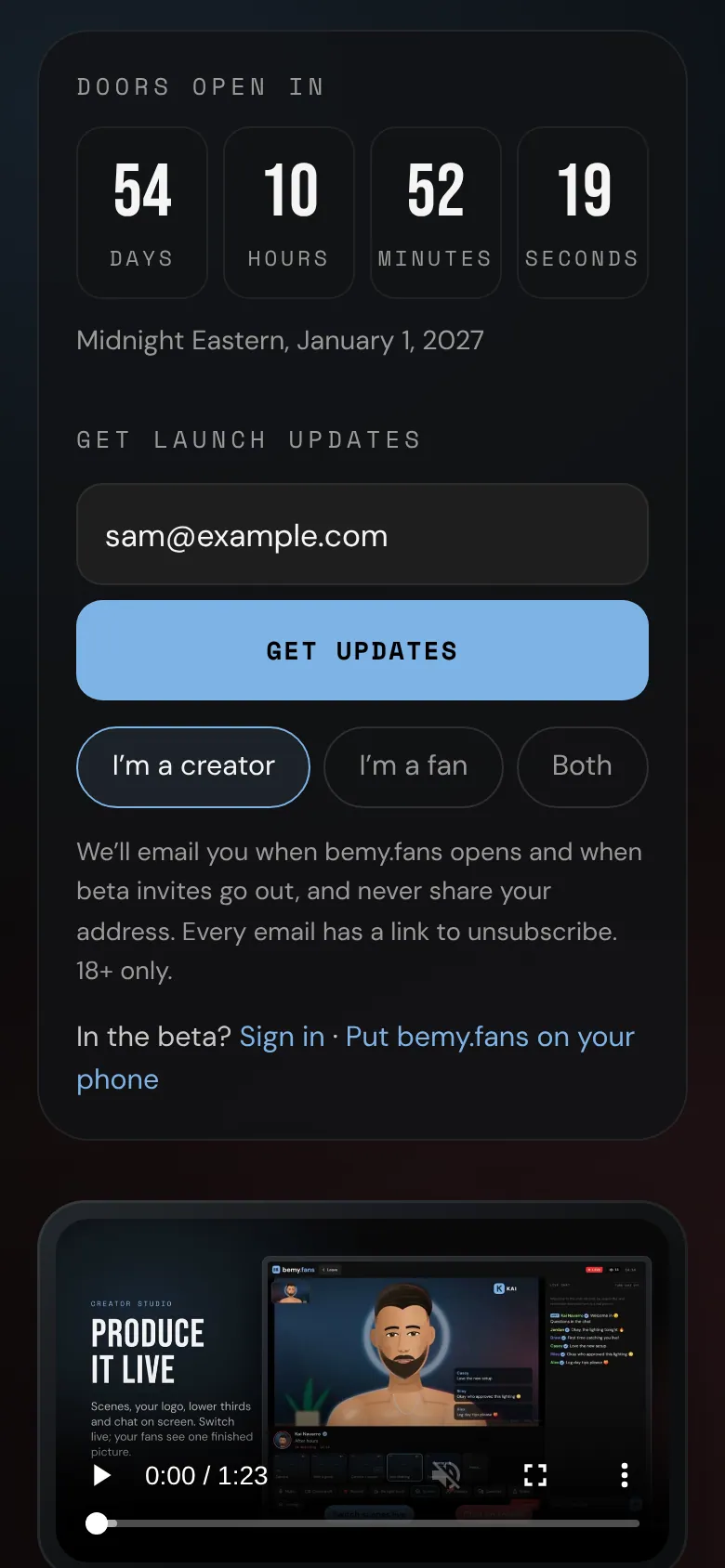
That's it: you're on the list. We'll email you when bemy.fans opens and when beta invites go out, and nothing else. Until you confirm, nothing more is sent. If the email isn't there after a few minutes, look in spam or promotions. Asking again sends a new one, but at most once an hour.
Good to know
- Every email has an Unsubscribe link: tap it, then Unsubscribe on the page that opens, and you're off the list. Changed your mind? Ask for updates again and confirm the new email.
- Asking again with the same address doesn't add you twice. If you're already on the list, you get a short You’re already on the bemy.fans list email instead, at most once a day.
- We never share your address. The list keeps your email, whether you create or watch, the site that sent you to bemy.fans (if any) and when you confirmed. See Privacy and safety.
Beta invites
Beta invites come by email from bemy.fans, called You’re invited to the bemy.fans beta. Each has its own link and a Join the beta button.
- Most invites are for one email address: sign up with the address the invite came to.
- Some invites work until a date. The email says which.
- The team sometimes shares an invite link with a small group instead. It works for a set number of people.
Join with your invite
- Tap Join the beta in your invite email. The sign-up opens with You’re invited to the bemy.fans beta at the top.
- If the invite is for one address, it's already filled in under Email.
- Fill in the rest as usual. See Create your account.
- Tap Join the beta.
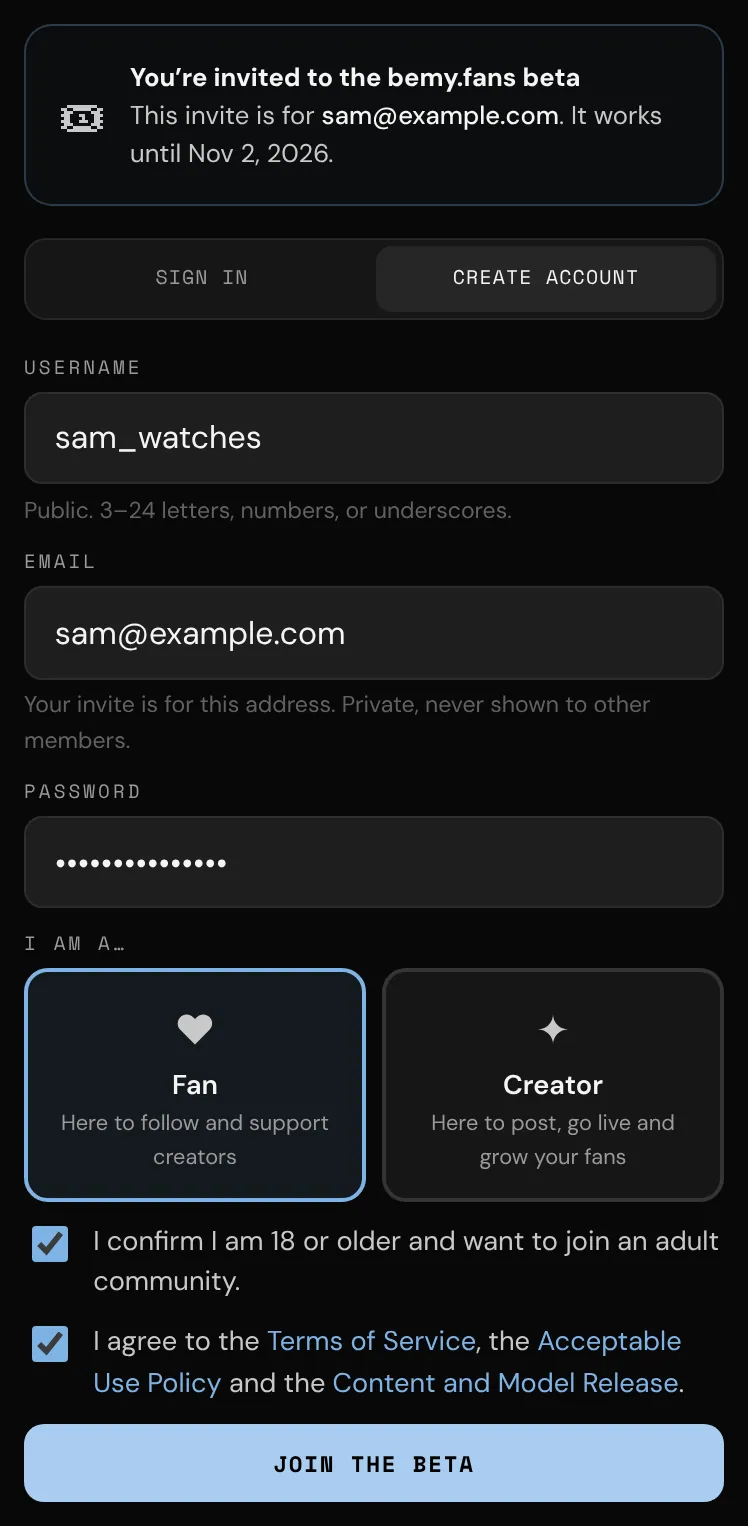
Everything you set up in the beta stays when bemy.fans opens: your profile, posts, followers and messages.
If your invite doesn't work
The page says why:
- This invite has expired. Ask for a new one.
- This invite has already been used. If you used it yourself, just sign in.
- This invite is for a different email address. Sign up with the address it was sent to.
- This invite link isn’t valid. Check you copied the whole link from the email.
Ask whoever sent the invite for a new one, and leave your email under Get updates in the meantime.
Without an invite
During the beta, Create account says Joining is by invite for now, with the same Get updates form. Members' own invite links don't open the sign-up yet either. They start working when bemy.fans opens. See Invite friends.
Already in the beta?
- Sign in as usual: tap Sign in at the top of the home page, or go to Sign in.
- Everything works as it will after launch, except inviting friends: the Invite friends card says Invites open at launch, and the setup guide skips that step.
- Something not working, or have an idea? Tell the team from Help → 💬 Ask a question or 🐞 Report a bug. See Contact bemy.fans Support.
When bemy.fans opens
bemy.fans opens to everyone on January 1, 2027: the home page counts down to it. Everyone on the list gets an email, and the home page and sign-up open to anyone 18 or older. Beta members don't need to do anything.